On Page SEO - Keyword Research - Structured Data
How To: Implement FAQ Schema Markup


TL;DR: FAQ schema uses structured data to describe question-and-answer content on a page. Google no longer displays FAQ rich results in Search, so it shouldn’t be implemented as a way to gain larger organic listings. However, FAQPage markup can still provide a machine-readable description of your FAQ content. This guide explains how to create, implement and validate FAQ schema using JSON-LD.
Is FAQ schema still relevant?
FAQ schema has changed considerably since I originally wrote this guide.
Historically, one of its main SEO benefits was making eligible pages appear with expandable questions and answers directly in Google’s search results. Google has since retired FAQ rich results, so that’s no longer a reason to implement it.
The underlying FAQPage structured data still exists at Schema.org and can be used to describe FAQ content in a machine-readable format.
This guide covers what FAQ schema is, how the markup works, how to create it using JSON-LD, and how to implement and validate it on your website.
What Is FAQ Schema Markup?
FAQ schema is structured data used to describe a page containing a list of questions and their corresponding answers.
It uses the Schema.org FAQPage type, with each FAQ represented as a Question containing an acceptedAnswer.
The schema doesn’t create the FAQs themselves. The questions and answers should exist as visible content on the page, with the structured data providing a machine-readable description of that content.
FAQ schema is different from QAPage schema. FAQPage is intended for pages where the website provides the questions and answers, whereas QAPage is designed for pages where users can submit answers to a question.
What happened to FAQ rich results?
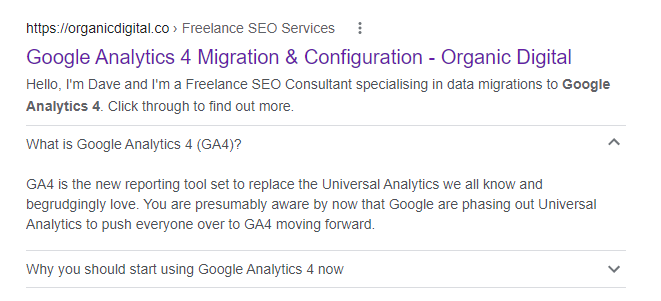
This is no longer how FAQ schema works in Google Search. Google has retired FAQ rich results, so adding FAQPage structured data won’t produce the expanded search result shown above.
I’ve kept the screenshot because it’s a useful example of what FAQ schema originally did in Google Search, but it shouldn’t be taken as a current benefit of implementing the markup.
Today, I treat FAQ schema primarily as a way of providing a structured, machine-readable description of FAQ content rather than as a tactic for gaining additional SERP visibility.
How Do You Write FAQ Schema?
FAQ schema can be added using different structured data formats, including Microdata and JSON-LD.
I use JSON-LD. It keeps the structured data separate from the visible HTML, is considerably easier to create and maintain, and avoids having to add schema properties throughout the page markup.
A basic FAQ implementation needs an FAQPage containing one or more Question entities, with each question containing an acceptedAnswer.
FAQ schema JSON-LD example
<script type="application/ld+json">
{
  "@context": "https://schema.org",
  "@type": "FAQPage",
  "mainEntity": [
    {
      "@type": "Question",
      "name": "What is FAQ schema?",
      "acceptedAnswer": {
        "@type": "Answer",
        "text": "FAQ schema is structured data used to describe questions and answers published on a web page."
      }
    },
    {
      "@type": "Question",
      "name": "How do you add FAQ schema to a website?",
      "acceptedAnswer": {
        "@type": "Answer",
        "text": "FAQ schema can be added to a page using JSON-LD, either directly within the website code or through a suitable CMS or tag management implementation."
      }
    }
  ]
}
</script>
Each additional FAQ is added as another Question within the mainEntity array.
The name contains the question, while acceptedAnswer contains the answer and its text property. The questions and answers represented in the markup should also be present as content on the page.
How Do You Validate Your FAQ Schema?
Once you’ve created your FAQ schema, validate it before adding it to a live page.
I use the Schema.org Markup Validator. You can paste your JSON-LD directly into the validator or enter the URL of a page where the markup has already been implemented.
The validator will identify the structured data it finds and highlight any errors or warnings in the markup.
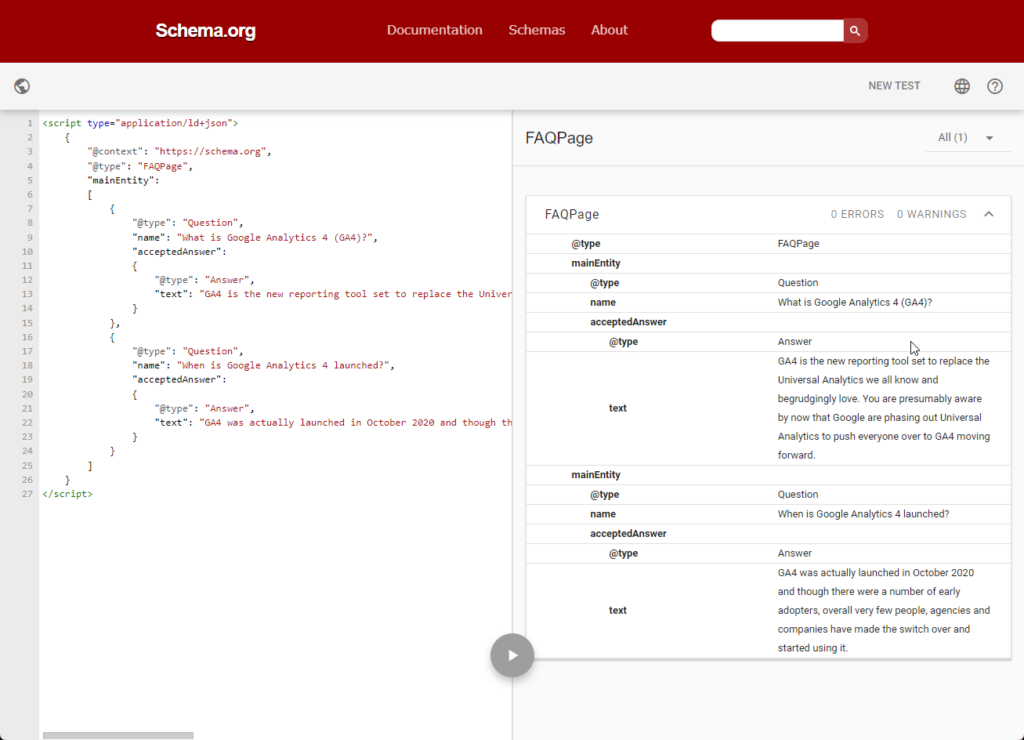
You may also come across Google’s Rich Results Test, but there’s an important distinction here.
The Rich Results Test is designed to identify structured data that can generate Google rich results. As Google no longer supports FAQ rich results, it isn’t the tool I’d use to determine whether your FAQPage markup itself is valid.
For that, use the Schema.org validator.
How Do You Implement FAQ Schema?
Once you’ve created and validated your JSON-LD, you need to add it to the page containing the corresponding FAQ content.
The cleanest option is usually to add the JSON-LD directly through the website or CMS. The markup can be placed in either the <head> or <body> of the page.
Exactly how you implement it will depend on the website. Some CMSs and SEO plugins can generate structured data automatically, while other sites may require the JSON-LD to be added manually.
If you can’t modify the website templates or page code directly, Google Tag Manager can also be used as an alternative implementation method.
How Do You Implement FAQ Schema Using GTM?
If Google Tag Manager is already installed on the site, you can use it to inject FAQ schema without modifying the page template directly.
Create a Custom HTML tag containing your JSON-LD and configure a trigger so the tag only fires on the page or pages containing the corresponding FAQ content.
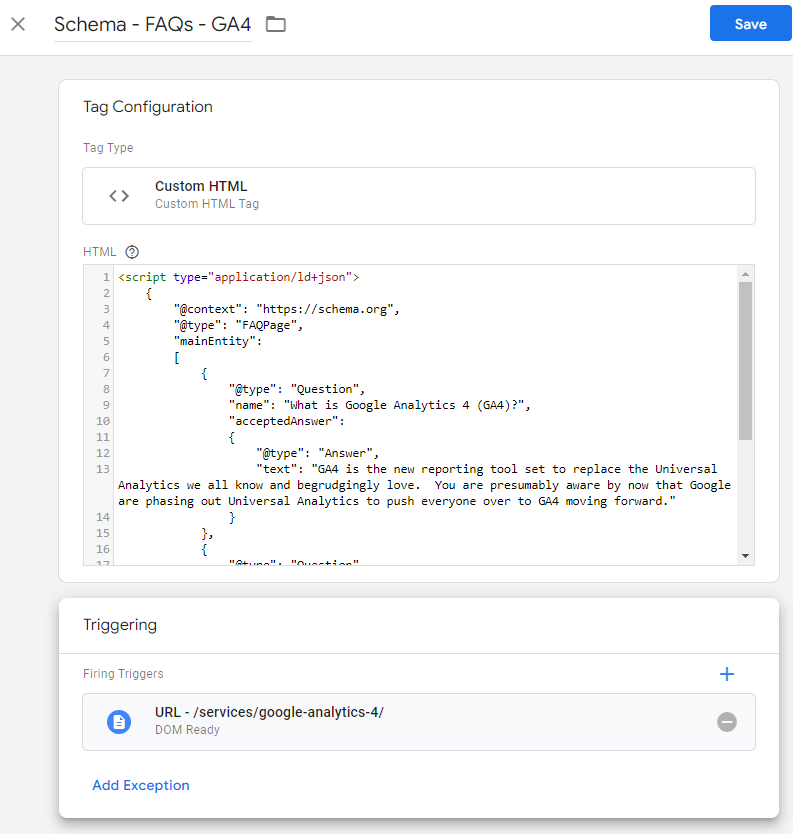
Once published, check the live URL using the Schema.org validator rather than assuming that the markup has been implemented correctly.
I generally prefer adding structured data directly through the website where that’s practical, but GTM can be a useful fallback when you don’t have access to the underlying templates or CMS implementation.
How Do You Implement FAQ Schema In WordPress?
There are several ways to add FAQ schema in WordPress, depending on your theme, plugins and how much control you want over the markup.
On this site, I’ve previously added the JSON-LD directly to the page using a Custom HTML block:
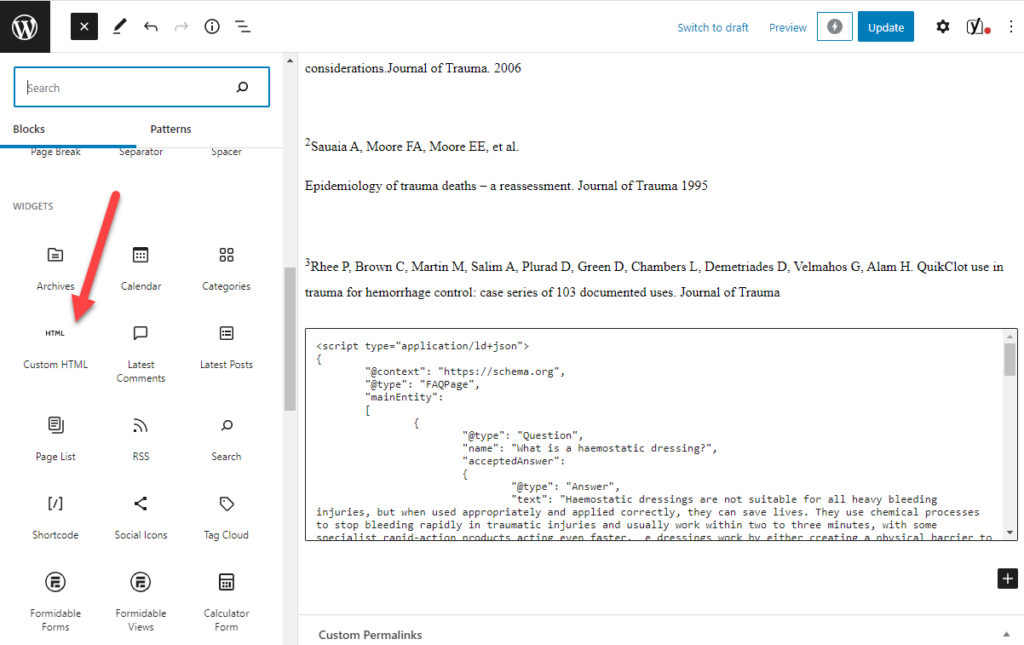
This is a simple option if you’re only adding FAQ schema to an occasional page and want complete control over the JSON-LD.
Alternatively, some WordPress SEO and schema plugins can generate FAQ structured data for you. If you use one of these, check the source or run the finished page through the Schema.org validator to make sure the expected FAQPage markup is actually being generated.
Whichever method you use, the important thing is that the structured data accurately represents the questions and answers visible on the page.
How do you find questions for your FAQ content?
If you’re adding FAQs to an existing page, Google Search Console can be a useful source of questions because it shows you the queries your page is already gaining impressions and clicks for.
Rather than repeat the process here, I’ve written a separate guide showing how to use Google Search Console regex to find the questions your users are asking.
This can help identify genuine questions worth answering on the page, rather than adding generic FAQs purely for the sake of having FAQ schema.
Is FAQ schema still worth implementing?
FAQ schema isn’t the SEO opportunity it once was. With Google no longer displaying FAQ rich results, you shouldn’t expect implementing FAQPage markup to increase SERP visibility or click-through rate in the way it could historically.
That doesn’t make the markup obsolete. If a page contains genuine FAQ content, FAQPage structured data provides a clear, machine-readable description of those questions and answers.
I wouldn’t add FAQs to a page purely so I could implement schema. The FAQs themselves should exist because they help answer useful questions around the topic. If they’re already there, adding accurate structured data is relatively straightforward.
My preference is to use JSON-LD, validate it using the Schema.org validator and, where possible, implement it directly through the website rather than relying on GTM.
If you’re reviewing how structured data is being used across your site, schema markup is one of the areas I look at as part of an SEO and website audit.

categories
- Analytics Insights
- Crawl Rate Insights
- Ecommerce SEO Insights
- International SEO Insights
- Keyword Research Insights
- Local SEO Insights
- Migrations Insights
- News Insights
- On Page SEO Insights
- Performance Analysis Insights
- SEO Audits Insights
- Site Speed Insights
- Structured Data Insights
- Tag Manager Insights
- Wordpress SEO Insights
latest posts
How To: Track GA4 AI Assistant Traffic, Including Historical Data

A Rough Guide To: LLMS.txt - What It Is & How To Create One

How To: Build SEO Content Hubs for Topical Authority

Case Study: Do Keywords in URLs Help SEO Rankings?

How To: Track Google Business Profile Traffic in GA4

get in touch
If you need some expert website optimisation and configuration, want to find out more, or even just have a question, fill in the form below as I will always be happy to help