Tag Manager - Crawl Rate
How To: Create a GTM Trigger for Multiple URLs and Parameters


TL;DR:
If you need a Google Tag Manager trigger to match multiple URLs or query parameters, you don’t need to create a separate condition for every variation. For smaller sets of patterns, you can use a regular expression within a single trigger. For longer or frequently changing lists, I prefer a Custom JavaScript variable that checks the current URL against an array of patterns and returns true when it finds a match.
Why I needed one GTM trigger for multiple URL patterns
Sometimes you need a Google Tag Manager trigger to fire across multiple URL patterns or query parameters, but creating a separate trigger condition for every possible variation quickly becomes difficult to manage.
I originally ran into this while dealing with unwanted parameterised and system-generated URLs on ecommerce websites. I wanted a single GTM trigger that could identify multiple URL patterns and then fire another tag when any of those patterns were present.
For example, you might want one trigger to match URLs containing any of the following:
?limit=
?order=
?mode=
/catalog/
/customer/
Rather than creating a separate trigger for every pattern, you can handle them within one GTM trigger.
There are two approaches I’ll show here: a simple regular expression for smaller sets of URL patterns, and a Custom JavaScript variable for longer lists that you want to maintain more easily.
I originally used this technique alongside a GTM-generated noindex tag. I’ve covered that implementation separately in my guide to adding a noindex tag with Google Tag Manager. The technique on this page isn’t specific to noindex tags though. You can use the same principle whenever a GTM trigger needs to match one of several URL patterns.
Match multiple URLs in GTM using regex
I’ll be honest, I hate Regex. I’ve been in the coding game to varying degrees for over 20 years and bar the pipe symbol, aka OR which looks like |, I can never get them to work. So, if I can avoid them, I will.
But the pipe symbol is one option here, to a degree, so far as my limited knowledge goes anyway.
If you want a GTM trigger to match several URL structures, a simple regular expression can be enough.

So, on my site, that would fire on:
- https://daveashworth.co/services-and-consultancy/
- https://daveashworth.co/services-and-consultancy/website-migrations-consultant/
- https://daveashworth.co/support/in-house/
- https://daveashworth.co/about/testimonials/
Where it starts to get messy, is when you want to fire URL parameters via the = symbol (it might be easy, but as I say, I hate regex and am not willing to take this any further).
If you have a large number of URL patterns or parameters you need to match, managing them all in one input box gets a bit fiddly. The following solution therefore is FAR better:
Match multiple URL parameters with a Custom JavaScript variable
This a much more elegant approach, as you can use a bespoke JavaScript function to set up an array of URL structures and parameters to check for – if one of them is present in the current URL, the variable returns true, if not, it returns false.
You would set up a Custom JavaScript Variable as follows:
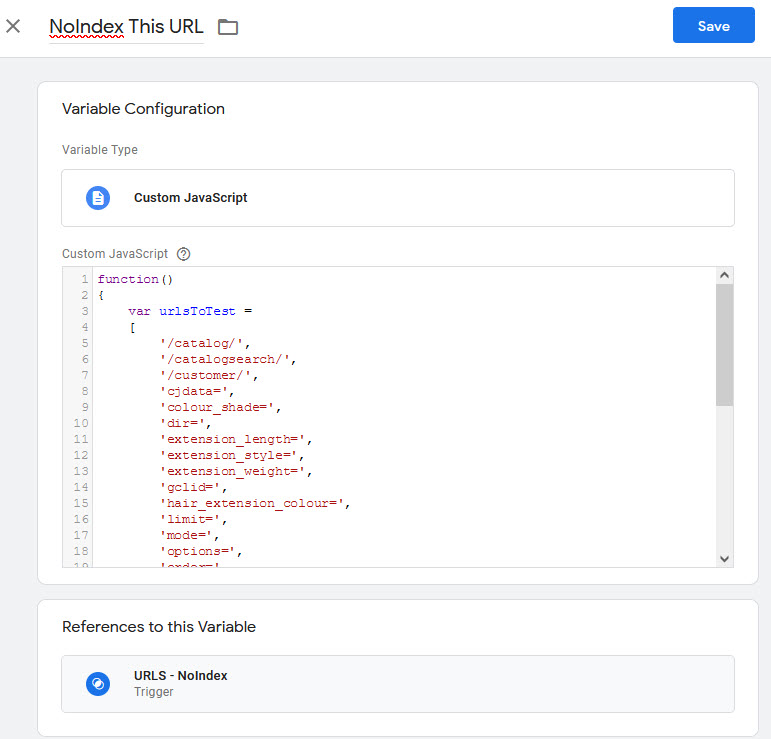
The full code is as follows:
function()
{
	var deIndexTheseURLs =
	[
		'/catalog/',
		'/catalogsearch/',
		'/customer/',
		'cjdata=',
		'colour_shade=',
		'dir=',
		'extension_length=',
		'extension_style=',
		'extension_weight=',
		'gclid=',
		'hair_extension_colour=',
		'limit=',
		'mode=',
		'options=',
		'order=',
		'p=',
		'platform=',
		'product_list_order=',
		'store=',
		'wig_length=',
		'q='
	];

	for (var i = 0; i < deIndexTheseURLs.length; i += 1)
	{
		if (document.location.href.indexOf(deIndexTheseURLs[i]) > -1)
		{
			return true;
		}
	};

return false;
}
Here, the list of structures is easy enough to manage and edit at any time.
The array contains various structure formats, which is then looped through and checks against the current URL to see if the URL structure is a substring.
If it is, it returns true, if not false.
You then set up a trigger to fire when the variable returns true, and associate this with your no index tag as follows:
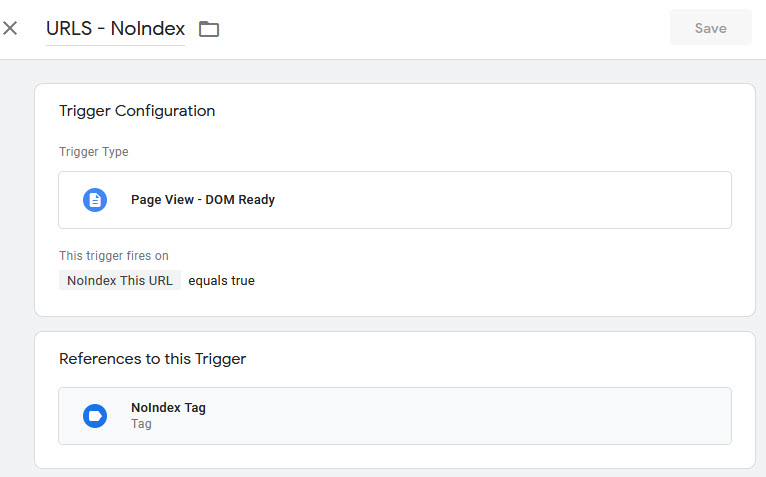
And that’s it. Easy. If you have any questions, queries or need any assistance getting this set up, feel free to get in touch, am always happy to help.

categories
- Analytics Insights
- Crawl Rate Insights
- Ecommerce SEO Insights
- International SEO Insights
- Keyword Research Insights
- Local SEO Insights
- Migrations Insights
- News Insights
- On Page SEO Insights
- Performance Analysis Insights
- SEO Audits Insights
- Site Speed Insights
- Structured Data Insights
- Tag Manager Insights
- Wordpress SEO Insights
latest posts
How To: Track GA4 AI Assistant Traffic, Including Historical Data

A Rough Guide To: LLMS.txt - What It Is & How To Create One

How To: Build SEO Content Hubs for Topical Authority

Case Study: Do Keywords in URLs Help SEO Rankings?

How To: Track Google Business Profile Traffic in GA4

get in touch
If you need some expert website optimisation and configuration, want to find out more, or even just have a question, fill in the form below as I will always be happy to help