Crawl Rate - Migrations
How To: Redirect URLs To Remove A Directory or Folder


TL;DR: If you need to remove the same directory or folder from lots of URLs, you don’t need to create individual redirects for every page. A single redirect rule can match the unwanted directory and 301 redirect each old URL to its equivalent without that folder. This guide shows how to do it using Apache .htaccess, NGINX and IIS, using old /amp/ URLs from my own site as the example.
Why I needed to remove a directory from multiple URLs
As an experienced website migration consultant, a common problem I come across is needing to 301 redirect a large number of URLs that all follow the same pattern.
One example is removing a directory or folder from the URL while keeping the rest of the path unchanged.
I ran into this when I disabled the AMP plugin on my own site. While AMP was enabled, my blog posts had an additional /amp/ directory, so:
https://daveashworth.co/blog/how-to-implement-faq-schema-markup/
also had an AMP URL:
https://daveashworth.co/blog/how-to-implement-faq-schema-markup/amp
After disabling the plugin, Google was still crawling the old /amp/ URLs, which resulted in 404 errors being reported in Google Search Console:
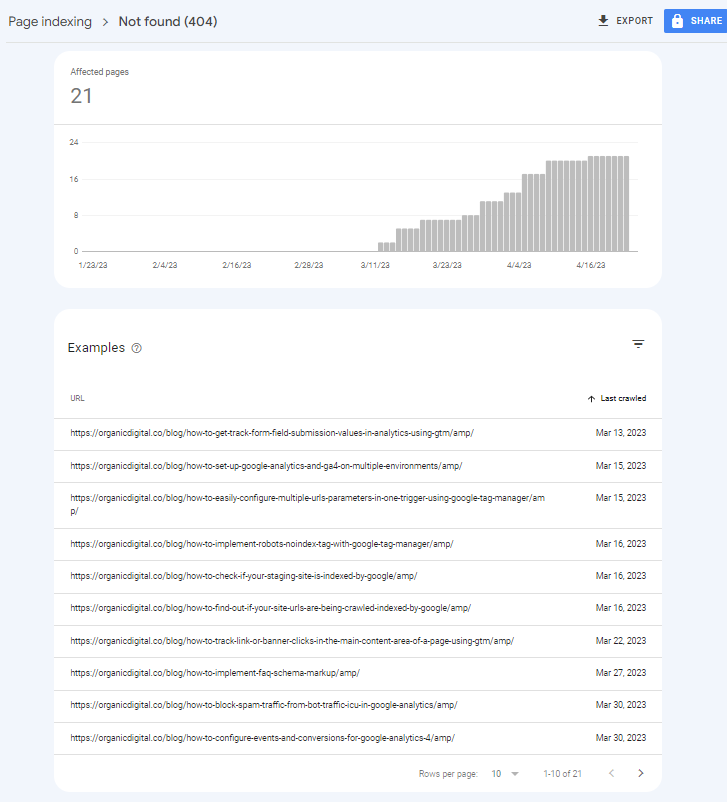
In this example there were only around 20 URLs, so I could have created individual redirects in .htaccess or using the Redirection WordPress plugin.
But that’s not particularly efficient — especially if you’re dealing with hundreds or thousands of URLs following the same pattern.
A better solution is to use a rewrite or redirect rule that matches every URL ending in /amp/ and permanently redirects it to the equivalent URL without that directory.
For example:
/blog/example-post/amp/ → /blog/example-post/
Below I’ll show how to do that using Apache/.htaccess, NGINX and IIS.
Remove a directory from a URL using .htaccess
RewriteEngine On
RewriteRule ^(.*?)/amp/$ $1/ [L,R=301]
This rule matches URLs ending in /amp/ and permanently redirects them to the same URL with the /amp/ directory removed.
For example:/blog/example-post/amp/ → /blog/example-post/R=301 tells Apache to return a permanent 301 redirect, while L tells it to stop processing further rewrite rules once this rule has matched.
If you need to remove a different directory, simply replace amp in the rule with the directory name you want to remove. For example, the same approach could be used for /feed/.
Remove part of a URL using NGINX
rewrite ^/(.*)/amp/$ /$1/ permanent;This NGINX rewrite rule matches URLs ending in /amp/ and permanently redirects them to the equivalent URL without that directory.
For example:
/blog/example-post/amp/ → /blog/example-post/
The (.*) portion captures the URL path before /amp/, while permanent tells NGINX to return a 301 redirect.
As with the .htaccess example above, you can adapt the rule to remove a different directory by replacing amp with the folder name you want to remove.
Remove a directory from a URL using IIS
- Open Internet Information Services (IIS) Manager and select the website where you want to apply the redirect.
- Open URL Rewrite and click Add Rule(s)…
- Select Blank Rule and give the rule a name, such as Remove /amp/ directory.
- Under Requested URL, select Matches the Pattern.
- Enter ^(.*?)/amp/$ as the pattern. This matches URLs ending in /amp/ and captures the preceding URL path.
- Under Action, select Redirect.
- Set the Redirect URL to {R:1}/.
- Set Redirect Type to Permanent (301) and leave Append query string unchecked.
- Click Apply to save the rule.
This permanently redirects a URL ending in /amp/ to the equivalent URL without that directory.
For example:
/blog/example-post/amp/ → /blog/example-post/
As with the Apache and NGINX examples, you can change amp in the pattern if you need to remove a different directory from your URLs.
Removing a directory from a URL at scale
And that’s it. Rather than creating hundreds or thousands of individual redirects, one rule can handle every URL that follows the same directory pattern.
Although I’ve used /amp/ throughout these examples, the same approach works whenever you need to remove a consistent directory from a group of URLs. For example, if you disable WordPress feeds, you could adapt the rules above to redirect URLs ending in /feed/ back to their parent URLs.
Whichever method you use, test the redirect before applying it across a large number of URLs. You want to make sure the old URL returns a 301 redirect directly to the correct new URL, rather than creating a redirect chain or accidentally matching URLs you didn’t intend to change.
If you’re making larger changes to your site’s URL structure, this becomes particularly important during a migration. I provide website migration consultancy covering redirect planning, implementation and post-migration checks.

categories
- Analytics Insights
- Crawl Rate Insights
- Ecommerce SEO Insights
- International SEO Insights
- Keyword Research Insights
- Local SEO Insights
- Migrations Insights
- News Insights
- On Page SEO Insights
- Performance Analysis Insights
- SEO Audits Insights
- Site Speed Insights
- Structured Data Insights
- Tag Manager Insights
- Wordpress SEO Insights
latest posts
How To: Track GA4 AI Assistant Traffic, Including Historical Data

A Rough Guide To: LLMS.txt - What It Is & How To Create One

How To: Build SEO Content Hubs for Topical Authority

Case Study: Do Keywords in URLs Help SEO Rankings?

How To: Track Google Business Profile Traffic in GA4

get in touch
If you need some expert website optimisation and configuration, want to find out more, or even just have a question, fill in the form below as I will always be happy to help