Performance Analysis - On Page SEO
How To: Use GSC & RegEx To Find Out The Questions Your Users Are Asking


TL;DR:
When carrying out a website SEO audit, Google Search Console can show you the actual questions your website is already appearing for. By using a simple regex filter, you can isolate question-based queries, find low-hanging content opportunities, and decide whether those questions are best answered by optimising existing content or creating something new.
Why find question-based queries in Google Search Console?
Question-based queries are useful because they show you, in your audience’s own language, what people want to know about topics your site is already appearing for.
That makes them particularly useful when reviewing existing content. A question getting impressions but few clicks might indicate that an existing page needs a clearer answer, a new section or more depth. Other questions may reveal a distinct enough intent to justify a separate article.
The important part is that this isn’t hypothetical keyword research. You’re working from queries for which Google is already showing your website.
How to use regex in Google Search Console to find questions
Regex (regular expression) lets you define a search pattern rather than filtering for one specific query. In Google Search Console, that means we can create a filter that returns queries beginning with common question words such as how, what, why, when and where.
Starting with your own site data, assuming you have a Google Search Console account in place (and if not, why not?), do the following:
1 – Go to “Performance”
2 – Set your time period – there’s no reason not to go with the maximum of 16 months if you have that much data
3 – Then click “Add Filter”

4 – Select “Query”

5 – Select “Custom RegEx”
6 – Select “Matches RegEx”

7 – Where it says “Enter regular expression (regex), enter the following:
^(where|who|why|what|which|should|can|could|does|do|is|are|when|how|whose)\bThis is basically a filter that will return all the keywords your site has appeared in search for where a question containing one of those words has been asked.
Once you’ve applied the regex filter, Google Search Console will show you the question-based queries your site has generated impressions and clicks for, such as:
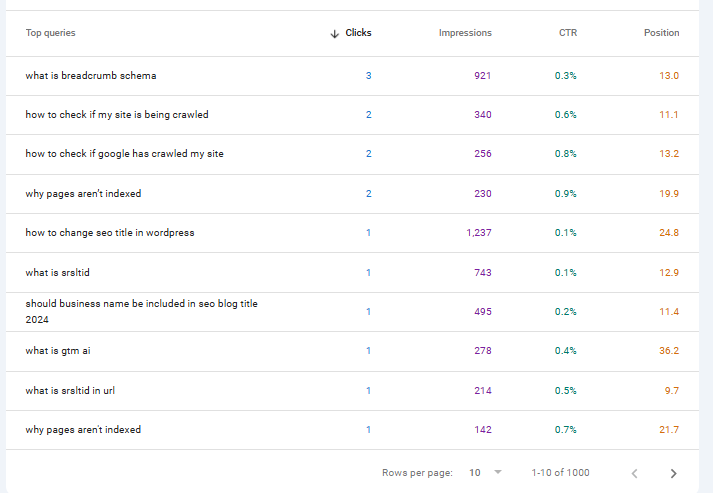
From here, I look for questions that could improve an existing page, reveal a content gap, or deserve a page of their own. You can also combine the regex query filter with a Page filter to investigate the questions Google is associating with a specific page or section of your site.
For example, I’ve already optimised various blog posts around questions, so if I filter the blog out of these results, I can concentrate on questions relating to the services I offer:
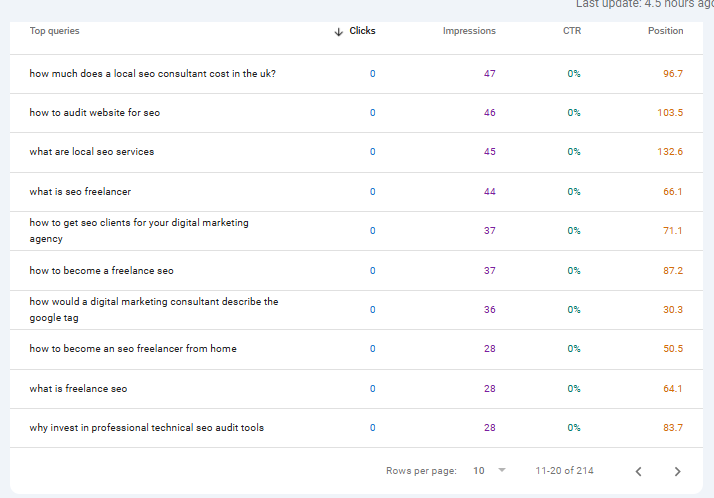
From here, I can see an opportunity to show my expertise around SEO audits by producing an article that addresses the following question:
- why invest in professional technical seo audit tools
This could support a guide comparing free and paid SEO audit tools, including when free tools are sufficient and when investing in professional tools makes sense. It also has a natural relationship with my technical SEO audit service.
Or
- how to become an seo freelancer from home
That’s a different type of opportunity. Rather than adding it to an existing service page, it could justify an article of its own where I share my experience of moving from agency work to freelancing, including working from home, finding clients, work-life balance and the pros and cons of working for yourself.
How to export GSC question queries for further analysis
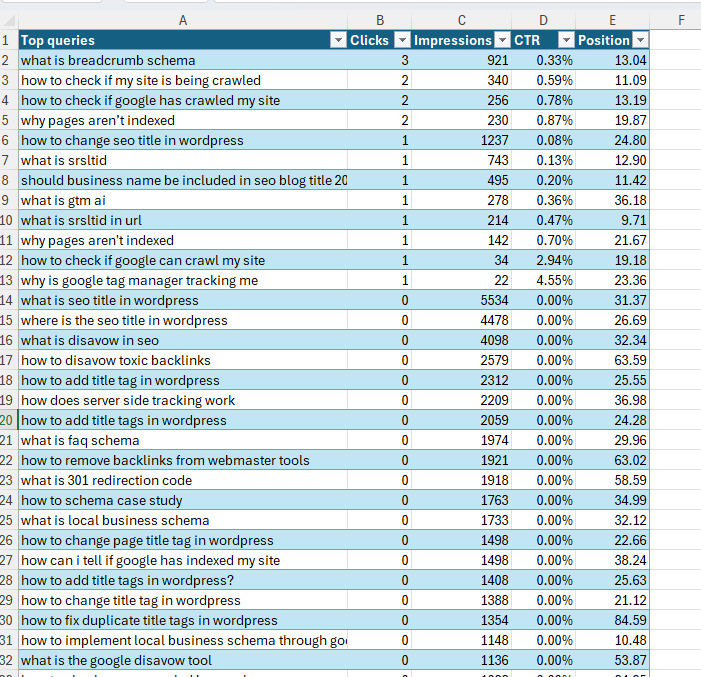
Another approach would be to export the data to Excel or Google Sheets, then filter the data in other ways:
1 – Export the data to your chosen spreadsheet format (I’m an excel type of a guy)

2 – Insert the data into a table
How to find low-hanging content opportunities with GSC regex
Once I’ve exported the question queries, I can start looking for opportunities where the site is already getting visibility but the existing content could do a better job of answering the query.
One simple way to narrow this down is to filter the average position. For example, filtering for positions of less than 20 gives me questions where the site is already appearing somewhere around the first two pages of the search results.
These are particularly interesting because Google already sees some relevance between the query and my content. Rather than starting from scratch, I can review the page that’s appearing and decide whether answering the question more directly could improve its visibility.

In my case, one query immediately stands out with more than 1,000 impressions:
”how to implement local business schema through google tag manager”
This relates to this article on the benefits of local business schema, which does mention tag manager, but I can see that if I introduce a section on how to implement schema using Google Tag Manager with that specific question as the heading, then I may be able to drive more clicks, or at least move up a place or two in the SERP:

When should you update an existing page or create a new one?
Finding a question in Search Console doesn’t automatically mean you need to create a new page.
If the question is closely related to the intent of a page that’s already getting impressions, I’ll usually look at improving that page first. That might mean adding a new section, answering the question more directly or expanding an existing explanation.
If the question represents a substantially different topic or search intent, it may deserve a page of its own. The “how to become an SEO freelancer from home” example above is a good example of that — it wouldn’t make sense to force that answer onto one of my SEO service pages.
The GSC data tells you what people are searching for and which of your pages Google is already associating with the query. You can then decide whether the opportunity is best served by improving that page or creating something new.
How often should you check GSC for new question queries?
This isn’t something you do once and tick off the list. Search behaviour changes, new content gets published and your pages can start appearing for questions they weren’t previously associated with.
I tend to revisit this periodically, particularly after publishing or significantly updating content. In fact, in a few months I’ll be looking at the queries this page itself has started generating impressions for to see whether there are new questions worth answering.
You don’t need any additional keyword research tools to do this. Google Search Console gives you the queries your site is actually appearing for, regex helps isolate the questions, and from there it’s a case of deciding whether to improve an existing page or create something new.

categories
- Analytics Insights
- Crawl Rate Insights
- Ecommerce SEO Insights
- International SEO Insights
- Keyword Research Insights
- Local SEO Insights
- Migrations Insights
- News Insights
- On Page SEO Insights
- Performance Analysis Insights
- SEO Audits Insights
- Site Speed Insights
- Structured Data Insights
- Tag Manager Insights
- Wordpress SEO Insights
latest posts
How To: Track GA4 AI Assistant Traffic, Including Historical Data

A Rough Guide To: LLMS.txt - What It Is & How To Create One

How To: Build SEO Content Hubs for Topical Authority

Case Study: Do Keywords in URLs Help SEO Rankings?

How To: Track Google Business Profile Traffic in GA4

get in touch
If you need some expert website optimisation and configuration, want to find out more, or even just have a question, fill in the form below as I will always be happy to help