Tag Manager - Ecommerce SEO - International SEO - On Page SEO - Performance Analysis
Magento SEO Case Study: Dynamic Product Meta Data Using GTM


TL;DR:
Optimising product metadata manually isn’t practical across tens of thousands of ecommerce product pages. For Heritage Parts Centre, I used Google Tag Manager to dynamically generate product title tags and meta descriptions using data including the product name, SKU, price, sale price, store region and regional USPs. This case study explains how I implemented the system across multiple international Magento stores and the subsequent increase in product-page search visibility and organic traffic.
Why I needed to generate Magento product metadata dynamically
Optimising product titles and meta descriptions individually isn’t practical when you’re working with an ecommerce website containing tens of thousands of products across multiple international stores.
That’s the problem I encountered while working with Heritage Parts Centre, a large Magento 2 website selling classic VW and Porsche parts across the UK, US, Australia and several European markets.
The site contained around 250,000 URLs, with more than 60,000 products across multiple regional stores. We wanted to improve product page title tags and meta descriptions at scale, while dynamically incorporating information such as the product name, SKU, price, sale price, store region and regional USPs.
Rather than waiting for a large Magento development project, I built a solution using Google Tag Manager, DOM variables, lookup tables and JavaScript to dynamically generate product metadata across the site.
This is a case study of how that implementation worked, including how the product data was extracted, how the title tags and meta descriptions were constructed for different regions and languages, and what happened to organic product visibility after the changes were introduced.
This isn’t a guide to Magento’s old meta keywords field. The optimisation here concerns the HTML <title> element and meta description used on Magento product pages.
The Magento product metadata problem
As part of my work as an Ecommerce SEO consultant, I was working with Heritage Parts Centre, a global supplier of spare parts and accessories for classic VW and Porsche vehicles.
The website operates separate stores for the UK, US, Australia, Germany, Spain and Italy, alongside an EU store serving other European countries. With more than 60,000 parts and accessories across over 40 vehicle models, the XML sitemap contained around 250,000 URLs.
In summary: it is a big site.
I originally came on board following a rebrand and website migration from Magento 1 to Magento 2, after which organic traffic had fallen.
The initial SEO audit identified several priorities. The first was sorting out redirects from the old website, including accurate mappings across approximately 57,000 legacy URLs covering products, categories and regional stores.
Once those migration issues had been addressed, attention moved towards improving on-page optimisation across the site. Product pages presented one of the biggest opportunities.
Magento 2 allows you to configure aspects of product metadata within the admin, including title and meta description templates, prefixes and suffixes. The challenge was that we wanted considerably more control over how the metadata was constructed.
We wanted to dynamically incorporate product-specific information such as product names, SKUs, prices and sale prices, while also changing the content according to the visitor’s regional store and language.
Doing all of that through Magento development would have meant raising development tickets whenever we wanted to implement, test or refine the templates. That’s understandable when developers have much larger functionality priorities, but it isn’t particularly agile when you’re trying to optimise metadata across tens of thousands of product pages.
This is where Google Tag Manager became useful.
Using GTM variables, lookup tables, triggers, Custom HTML and JavaScript, I could extract information already available on each Magento product page and use it to dynamically construct the title tag and meta description.
More importantly for this particular website, the templates could vary by region and language. That made the solution part of the wider international SEO strategy rather than simply a way of changing a few title tags.
Implementing hreflang across the Magento stores
Before tackling the product metadata, another important part of the international SEO work was making sure Google understood the relationship between the different regional and language versions of the product pages.
The site hadn’t previously implemented alternate language tags, so we introduced hreflang annotations across the regional stores.
For this, we used the Alternate Language Tags extension from Magmodules, which handled the Magento 2 hreflang implementation across the different stores.

With the relationships between the international stores established, the next step was improving the title tags and meta descriptions being generated across the individual product pages.
The Pre-Optimisation Meta Data
Before building the dynamic metadata templates, I reviewed how title tags and meta descriptions were currently being generated across the different regional stores.
The title tags already included regional suffixes, but the meta descriptions were much less consistent. Some contained little more than the product name, others used generic regional copy, and some were pulling HTML directly from the product description.
The examples below show the existing metadata for two products across the different international stores, one at its standard price and another on special offer.
Product Not On Offer – Fuel Tank
https://www.heritagepartscentre.com/uk/170201075j-fuel-tank.html
| Region | Title | Description |
| AU | Fuel Tank | Heritage Parts Centre AU | Fuel tank<br> |
| DE | Kraftstofftank | Heritage Parts Centre DE | Wir haben unsere Marke umbenannt, liefern aber immer noch eine große Auswahl an Teilen und Zubehör für klassische VW- und Porsche-Modelle |
| ES | Deposito de combustible | Heritage Parts Centre ES | Hemos cambiado de marca, pero aún almacenamos y suministramos una amplia gama de piezas y accesorios para los modelos clásicos de VW y Porsche. |
| EU | Fuel Tank | Heritage Parts Centre EU | Fuel tank<br> |
| IT | Serbatoio carburante | Heritage Parts Centre IT | Abbiamo rinominato ma ancora immagazziniamo e forniamo una vasta gamma di parti e accessori per i modelli classici VW e Porsche |
| UK | Fuel Tank | Heritage Parts Centre UK | Fuel tank<br> |
| US | Fuel Tank | Heritage Parts Center US | Fuel tank<br> |
Product On offer – Door Hinge Kit for Left or Right
https://www.heritagepartscentre.com/uk/90153103120-door-hinge-kit-for-left-or-right.html
| Region | Title | Description |
| AU | Door Hinge Kit for Left or Right | Heritage Parts Centre AU | <p>Door hinge kit for left or right.</p><p><br>Set includes both hinges for one door, does not include mounting bolts.</p> |
| DE | Türscharnier-Set, ohne Schrauben/Bolzen, pro Tür | Heritage Parts Centre DE | Türscharnierset zur Montage an der linken oder rechten Tür. Der Satz enthält alle Scharniere mit Ausnahme der Bolzen zum Aufhängen der Tür.</div> |
| ES | Kit bisagra puerta. Para 1 puerta | Heritage Parts Centre ES | <p>Kit bisagra puerta para lado derecho o izquierdo.</p><p><br></p><p>El kit incluye todas los herrajes excepto los tornillos para colgar la puerta.<br></p><p><br></p><p><br></p> |
| EU | Door Hinge Kit for Left or Right | Heritage Parts Centre EU | <p>Door hinge kit for left or right. Set includes both hinges for one door, does not include mounting bolts.</p> |
| IT | Kit cerniere porta per guida a dx | Heritage Parts Centre IT | Abbiamo rinominato ma ancora immagazziniamo e forniamo una vasta gamma di parti e accessori per i modelli classici VW e Porsche |
| UK | Door Hinge Kit for Left or Right | Heritage Parts Centre UK | <p>Door hinge kit for left or right. Set includes both hinges for one door, does not include mounting bolts.</p> |
| US | Door Hinge Kit Excluding bolts to Hang One Door | Heritage Parts Center US | <p>Door hinge kit to fit the left or right door.<br>Set includes all hinges excluding bolts to hang one door.</P> |
At this scale, manually writing metadata for every product and every regional store wasn’t realistic. We needed a repeatable template that could use the information already available on each product page while still allowing the output to vary by product, region, language and whether the item was on offer.
Product metadata requirements
Based on the existing product pages, I drew up a set of requirements for the new dynamic metadata.
The title tags needed to:
- be unique across the different regional stores
- include the product name
- include both the original and formatted product SKU, where appropriate, because customers searched using different variations of the part numbers
- identify the relevant regional store
The meta descriptions needed to:
- be generated specifically for each product rather than pulled from the product description
- use the appropriate language and sentence structure for each regional store
- include the current product price
- change when a product was on special offer
- include a relevant regional USP, such as the applicable delivery proposition
To generate all of that dynamically, I needed GTM to extract or calculate several pieces of information from each Magento product page.
Extracting Magento product data with GTM variables
The information required to build the title tags and meta descriptions was already available either within the product page or from the URL. The next step was to turn that information into variables that could be reused within GTM.
For each product, I needed:
- store region
- product name
- product SKU
- formatted product SKU
- current price
- old and new prices when the product was on offer
- a USP specific to the regional store
I could then combine those variables later to dynamically construct the required metadata.
How To Configure Store Region
Whilst the regions are already in the title tags, as we are creating new titles, and for other purposes, we wanted to set a custom variable that captured the region. As each store is within a subfolder named for that region – e.g. /uk/ – we can do this by extracting it from the URL.
To do this we configure a URL of type “Custom JavaScript” that gets the current URL and splits it into an array via the slashes – and we know the region will always be in the 3rd array element:
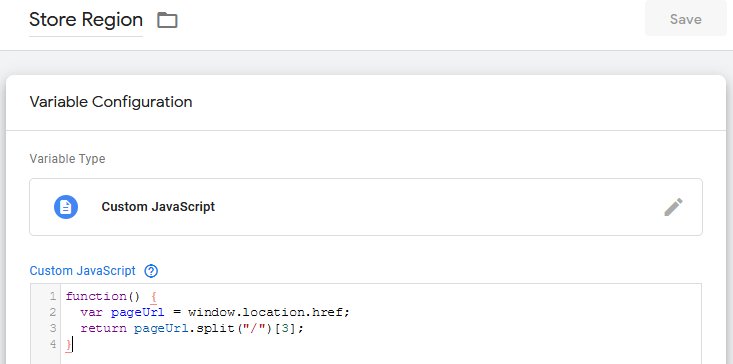
So on this URL:
https://www.heritagepartscentre.com/uk/170201075j-fuel-tank.html
the region is set as follows:

Whilst we could just use a JavaScript function to convert this to uppercase, we used a lookup table based up the variable to set the region, as this will give us greater flexibility further down the line if we wish to amend the region name in the title tag – e.g. USA instead of US

Which is then set as follows on the above URL:

This can now be used in our tags and triggers by referring to {{Title Tag Region}}
How To Configure Product Name
All the product data we need is within the page content, so we can use CSS selectors to pull in each variable:

So in this case, we grab the contents of .page-title .base

Which we can refer to using {{Product Name}}:

How To Configure Product SKU
Like above, the SKU is also in a uniquely named div:

So, the variable is set as follows:

Which we can refer to using {{Product SKU}}

How To Configure A Formatted Product SKU
By default, the SKU contains / and – for example:
170-201-075/J
Some users will search with these characters, some without – so we wanted to include both. By using a custom JavaScript variable, we can pass the SKU then remove the / and – and return the formatted SKU.
I apologise for what looks like horribly inefficient code, but the replace function wasn’t working how I anticipated, so I just hacked this together to remove up to 4 instances of each character:
As you can see, it passes in the previously captured SKU, works its “magic”, then sends back a nicely formatted SKU:

Again, sorry about that code, but anyway, we can now refer to this using {{Product SKU Formatted}}

How To Configure Current Price
If the product is not on offer, the price can be found here:

Again, we use a CSS selector to grab this value:

And this is called using {{Product Price}}

How To Check If On Offer And Configure Old & New Price
If a product is on offer, the prices appear as follows:
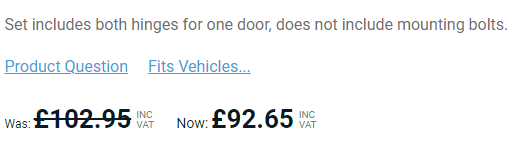
These appear in the classes .old-price and .special-price

So, we set them accordingly:

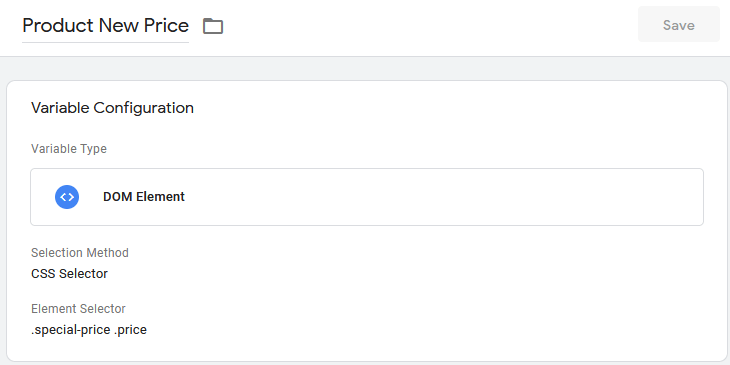
As the .special-price only appears on product pages which are on offer, we can set a variable called “Product On Offer” of type “Element Visibility” which is set to true or false depending on if this element is on the page:

We then have 3 more potential variables we can use:
{{Product On Offer}}
{{Product Old Price}}
{{Product New Price}}
If the product is not on offer, we see:

Whereas if it is, these are populated accordingly:

(I am not sure why they appear as “null” and “false”, when they should be “false” and “true” – I must look into this)
How To Configure USP Unique To Store Region
We want to include a USP within the meta to encourage the click through from the SERPs. The delivery price is different in each region whilst DE, IT and ES need to be translated. As we already have the region as a variable, the USP can be set via a look up table taking {{Store Region}} as the input:

This is called using {{Product USP}}

Summary Of Configured Variables
For each product we now have a set of variables we can use to create our unique meta data:
https://www.heritagepartscentre.com/uk/170201075j-fuel-tank.html
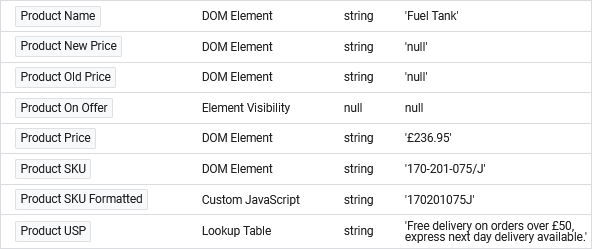
https://www.heritagepartscentre.com/es/90153103120-kit-bisagra-puerta-para-1-puerta.html

How To Create A Product Page Trigger
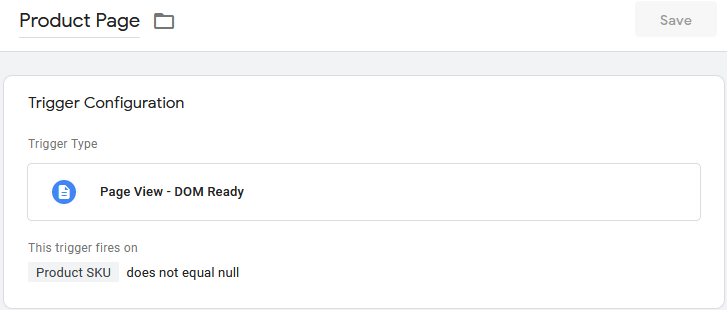
Before we create our custom tag, we need a trigger that will allow us to identify if we are on a product page, or not.
There are several variables available to us, so we chose {{Product SKU}} – if this is not null, we know we are on a product page, so set up the trigger accordingly:
How To Create Custom HTML Tag For Dynamic Meta Data
Finally, on to the good stuff.
For this we use a custom HTML tag that will contain JavaScript and utilise jQuery to manipulate the key elements within the page.
First, we need to create the variables we will use and set these according to the custom variables set up previously:
var p_name = "{{Product Name}}";
var p_sku = "{{Product SKU}}";
var p_sku_formatted = "{{Product SKU Formatted}}";
var p_region = "{{Title Tag Region}}";
var p_on_offer = "{{Product On Offer}}";
var p_price = "{{Product Price}}";
var p_old_price = "{{Product Old Price}}";
var p_new_price = "{{Product New Price}}";
var p_product_usp = "{{Product USP}}";
To set the title tag, we want to append the product name, formatted SKU and insert the brand followed by the region:
var p_title = p_name + ": " + p_sku_formatted + " | Heritage Parts Centre " + p_region;We then use jquery to remove the existing title tag, and create a new one populated with the text above:
jQuery('title').remove();
var p_title_tag = document.createElement('title');
p_title_tag.text = p_title;
jQuery('head').append(p_title_tag);
Whilst I prefer the syntax of JQuery, the following more efficient code wil also work and supports sites that don’t utilise JQeuery:
document.title = p_title;For the meta description, we have differing formats depending on whether the product is on offer, and then different languages depending on the region. We will translate for DE, IT and ES, whilst AU, US, EU and UK will all use the same text.
The format we decided on in English was:
Buy the product_name (product_SKU) online for product_price. Product_uspe.g.
Buy the Fuel Tank (170-201-075/J) online for £236.95. Free delivery on orders over £50, express next day delivery available.If the product is on offer, the wording is as follows:
Buy the product_name (product_SKU) online. Was old_price, now new_price. Product_uspe.g.
Buy the Door Hinge Kit for Left or Right (901-531-031-20) online. Was £102.95, now £92.95. Free delivery on orders over £50, express next day delivery available.We also have the flexibility to change the structure of the sentences depending on the language.
To do this, we used the following code which utilises and if statement to determine if the product is on offer, and then switch statements to set to description according to the region – DE, ES and IT, or default English for AU, EU, UK and US – if we want to have specific descritpions for any English regions at any point, we just add in a further case:
if (p_on_offer == "null")
{
	switch(p_region)
	{
		case "DE":
			var p_desc = "Bestellen Sie " + p_name + " (" + p_sku + ") auf unserer Webseite für " + p_price + ".  " + p_product_usp;
			break;

		case "ES":
			var p_desc = p_name + " (" + p_sku + ") disponible en línea por " + p_price + ".  " + p_product_usp;
			break;

		case "IT":
			var p_desc = "Acquista " + p_name + " (" + p_sku + ") online per " + p_price + ".  " + p_product_usp;
			break;

		default:
			var p_desc = "Buy the " + p_name + " (" + p_sku + ") online for " + p_price + ".  " + p_product_usp;
	}
}
else
{
	switch(p_region)
	{
		case "DE":
			var p_desc = "Bestellen Sie " + p_name + " (" + p_sku + ") auf unserer Webseite.  Regulärer Preis " + p_old_price + " - Sonderpreis " + p_new_price + ".  " + p_product_usp;
			break;

		case "ES":
			var p_desc = p_name + " (" + p_sku + ") disponible en línea.  Precio inicial " + p_old_price + " - Precio rebajado " + p_new_price + ".  " + p_product_usp;
			break;

		case "IT":
			var p_desc = "Acquista " + p_name + " (" + p_sku + ") online.  Prezzo originale " + p_old_price + " - Prezzo scontato " + p_new_price + ".  " + p_product_usp;
			break;

		default:
			var p_desc = "Buy the " + p_name + " (" + p_sku + ") online.  Was " + p_old_price + " - Now " + p_new_price + ".  " + p_product_usp;
	}
}
And add this to the page as follows:
jQuery('meta[name="description"]').remove();
var p_meta_desc = document.createElement('meta');
p_meta_desc.name = 'description';
p_meta_desc.content = p_desc;
jQuery('head').append(p_meta_desc);
Or, again, without JQuery go with:
document.getElementsByTagName('meta')["description"].content = p_desc;And that is it – the Custom HTML tag is set up containing the code above to be fired by the product page trigger:

And the good news is, the dynamically generated code is crawled, parsed and indexed by Google. Bing doesn’t. But so what.
We can see this using the site query operator to look for the SKU:


How To Analyse Product Page Performance
The amends had a significant impact on the organic visibility and traffic generated by the product pages on the site.
It’s easy to just say that, but, in the name of a comprehensive case study, I’m going to prove it.
Whilst one of my favourite SEO tools, the performance data in Google Search Console is limited to 1000 pages at a time, however, there are ways of getting a more definitive overview of your site’s search data.
For those with budget, I highly recommend Ryte which has a comprehensive Search Success module which allows you to see ALL your site’s URL search data within any given time frame:

Or, if on a budget and you want the same thing for free, Alyeda Solis has created a Google Data Studio Dashboard that basically does the same thing, that being, the ability to download all your search data.
Once we had this data month by month, we then used Screaming Frog SEO Spider and it’s custom extraction tool to crawl the URLs and identify which were products via the SKU code being in place on the page.
To do this, right click on the SKU in the web page and select “Inspect”:

Then, from within the code, select the element containing the text you want to extract and right click then select “Copy -> Copy Selector” to get the CSS path:

Which gives you the following:
#maincontent > div.columns > div > div.full-width.top.wrapper > div.product-info-main > div.product.attribute.sku > divWithin Screaming Frog, we can then paste in all the URLs into list mode after we’ve set “Configuration -> Custom -> Extraction” and set this to your CSS path:

This will then crawl all your URLs and where the SKU is in place, this will be flagged in the custom extractor field:

If Screaming Frog isn’t your thing, you can also use Sitebulb for website content extraction.
Either way, export the data, put the original search console export data in one excel tab, your crawl data in another, use a VLOOKUP to match and flag the product URLs with an SKU in place, which you then filter to obtain just product page data:

Optimisation work began on the site on October covering fundmental tech SEO actions such as crawl rate optimisation and breadcrumb schema optimisation – this had a positive impact, but more so on the category landing pages across the site. The product meta optimisation described above was implemented in December, and as you can see, it did good in terms of unique product pages and keyword generating impressions, clicks and click through rate:
| OCT | NOV | DEC | JAN | FEB | MAR | |
| Unique Pages | 14,448 | 15,414 | 16,033 | 21,750 | 32,996 | 34,113 |
| Unique Keywords | 34,898 | 39,008 | 35,969 | 35,073 | 50,428 | 49,572 |
| Total Impressions | 224,703 | 239,396 | 241,611 | 218,841 | 324,858 | 354,877 |
| Total Clicks | 2,580 | 2,976 | 2,768 | 3,028 | 3,585 | 5,150 |
| Click Through Rate | 1.15% | 1.24% | 1.14% | 1.38% | 1.10% | 1.45% |
The same data, but in a graph:

Whilst Ryte allows us to see new keywords this year to date which includes a lot of product part IDs due to them now being in the title tag and meta description:

The End Result
Enhanced Visibilty = More Long Tail Organic Traffic = More Reveune = Happy Client
But don’t just take my word for it:
Heritage Parts Centre started working with Dave mid-2020, presenting to him a number of challenges following a website migration earlier in the year. What Dave provided saw a number of quick wins (that quickly and drastically stabilised our organic traffic), and subsequently worked through some more strategic technical SEO optimisations that has seen a tremendous improvement in our SEO performance. It has been refreshing to work with Dave who have been genuinely excited by the unique challenges that our market presents, and look forward to continue our work with him. His direct, professional, pragmatic and creative problem solving and optimisation methods continue to make a positive difference to our business, and I recommend him highly.



Have been working with Dave for 6 months now and very impressed with the technical SEO work that he has carried out particularly around GTM. His reports and roadmap are clear and concise and the work is returning good results.


categories
- Analytics Insights
- Crawl Rate Insights
- Ecommerce SEO Insights
- International SEO Insights
- Keyword Research Insights
- Local SEO Insights
- Migrations Insights
- News Insights
- On Page SEO Insights
- Performance Analysis Insights
- SEO Audits Insights
- Site Speed Insights
- Structured Data Insights
- Tag Manager Insights
- Wordpress SEO Insights
latest posts
How To: Track GA4 AI Assistant Traffic, Including Historical Data

A Rough Guide To: LLMS.txt - What It Is & How To Create One
How To: Build SEO Content Hubs for Topical Authority

Case Study: Do Keywords in URLs Help SEO Rankings?

How To: Track Google Business Profile Traffic in GA4

get in touch
If you need some expert website optimisation and configuration, want to find out more, or even just have a question, fill in the form below as I will always be happy to help